Where's the truck: list your pop-up stops
Add the markets, festivals and pop-ups you'll be at, and your website lists them. Choose what each event shows.
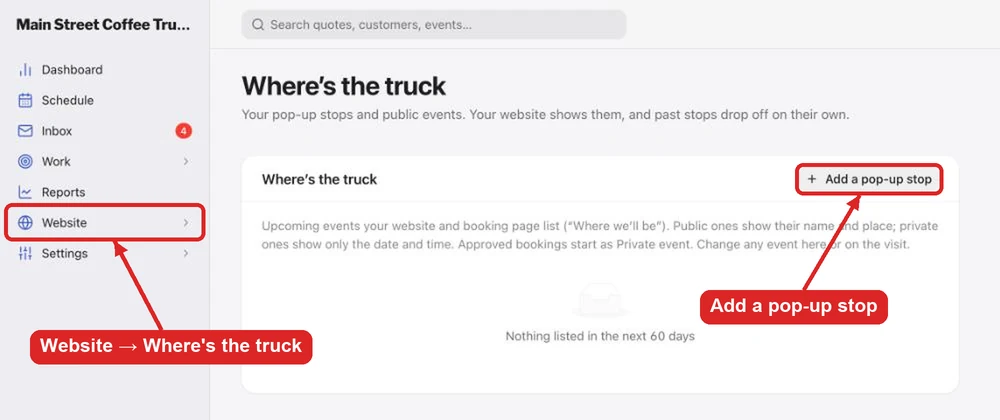
Food trucks with online booking get Website → Where's the truck: the list of stops and events in the next 60 days that your website and booking page show under "Where we'll be". Past stops drop off on their own.
Add a stop
- Go to Website → Where's the truck and click Add a pop-up stop.
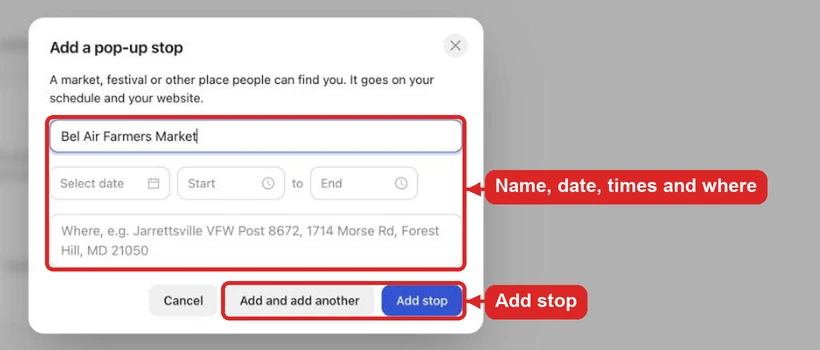
- Enter the name (for example Trunk or Treat), the date, the start and end time, and where. Start typing a place or address and pick it from the list.
- Click Add stop, or Add and add another to enter several in a row.
Each stop also goes on your schedule.
What each event shows
| Listing | What your website shows |
|---|---|
| Public | The event's name, place, date and time |
| Private event | Only the date and time |
| Hidden | Nothing |
Events you book by approving a request start as Private event. To show one by name (a festival that booked you, say), change it to Public here or on the event itself.